Available 3PLICITY Triggers
When selecting 3PLICITY as the Trigger application in Zapier, you can create automations based on events generated by both 3PL Company and Merchant accounts.
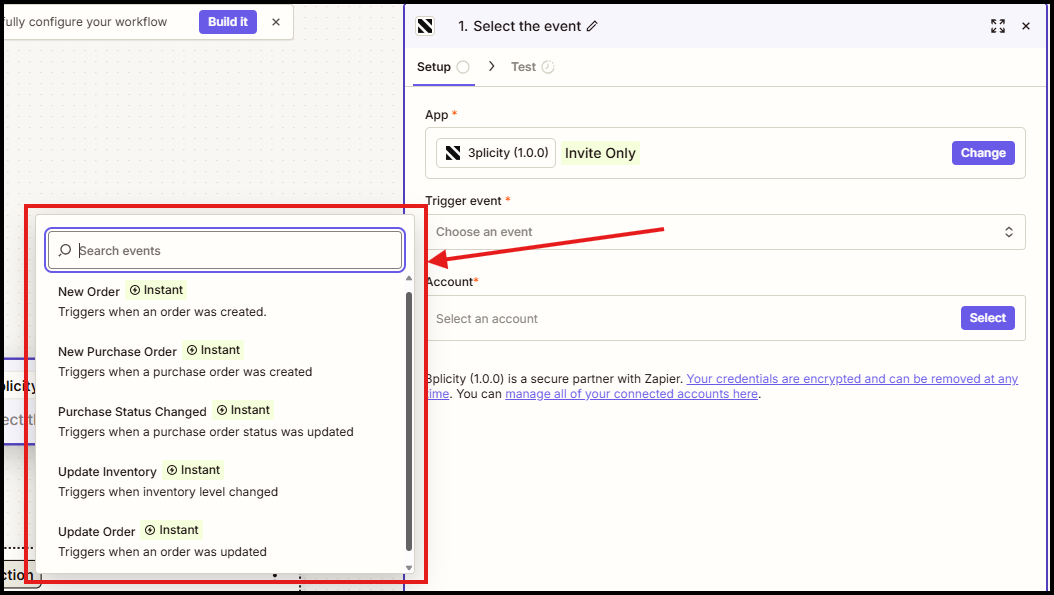
3PL Company Triggers
→ New Purchase Order
Triggers whenever a new Purchase Order is created for the connected 3PL Company.
This event can be used to:
Notify warehouse teams
Create tasks in project management tools
Send emails or Slack notifications
Trigger downstream operational workflows
→ New Sales Order
Triggers whenever a new Sales Order is created.
This event is commonly used to:
Notify fulfillment teams
Create tickets or tasks
Update external systems
Send customer or internal notifications
→ Sales Order Updated
Triggers whenever a Sales Order is updated.
Examples include:
Tracking number assigned
Carrier assigned or changed
Shipping label generated or updated
Order status changed
Other operational updates made during fulfillment
→ Inventory Adjustment
Triggers whenever inventory quantities are adjusted by the 3PL Company.
Examples include:
Manual inventory adjustments
Quantity corrections
Stock updates after warehouse operations
This trigger can be used to keep external inventory management or reporting systems synchronized.
Merchant Triggers
→ Purchase Order Status Updated
Triggers whenever the status of a Purchase Order changes.
Examples include:
Pending
Approved
Cancelled
Other status changes during the receiving process
This trigger can be used to notify purchasing teams or update external systems automatically.
→ Sales Order Updated
Triggers whenever a Merchant Sales Order is updated.
Examples include:
Carrier assigned
Tracking number assigned
Order status changed
This trigger is useful for notifying customers, updating CRM platforms, or synchronizing shipping information.
→ Inventory Adjustments Received
Triggers whenever inventory adjustments are received from the connected 3PL Company.
Examples include:
Quantity updates after receiving inventory
Warehouse inventory corrections
Product stock adjustments
This allows Merchants to keep inventory records synchronized across connected applications.
Was this article helpful?
That’s Great!
Thank you for your feedback
Sorry! We couldn't be helpful
Thank you for your feedback
Feedback sent
We appreciate your effort and will try to fix the article