Managing Shopify Inventory as a Merchant
Overview
3PLICITY allows Merchants to synchronize inventory directly from Shopify and manage product information across both platforms.
Once a Shopify store is connected, products can be imported into 3PLICITY, inventory quantities can be synchronized, and product updates made in Shopify can be reflected within the Merchant inventory.
This integration helps maintain consistent product information between Shopify and 3PLICITY while supporting fulfillment and inventory operations.
Prerequisites
Before synchronizing inventory, ensure that:
Your Shopify store is connected to your Merchant account.
Products are active and available within Shopify.
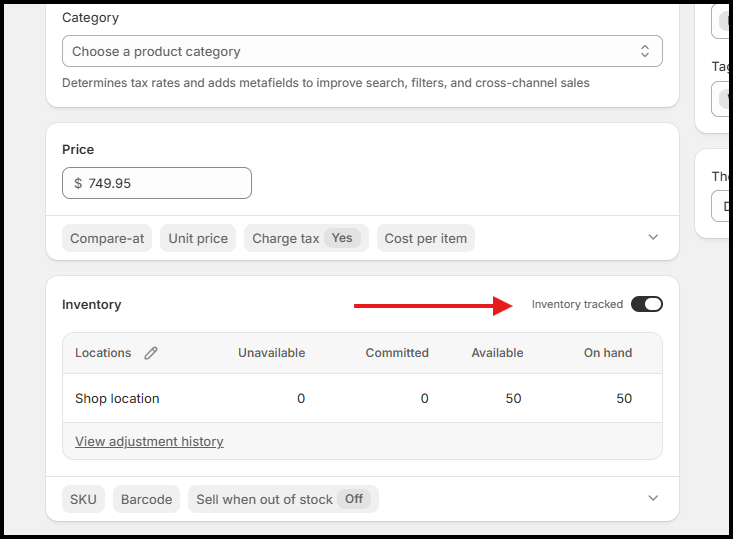
The Inventory Tracked option is enabled for products that require inventory synchronization.
Products that do not have inventory tracking enabled may not synchronize inventory quantities correctly.
Synchronizing Products from Shopify
When a Shopify store is connected:
Navigate to Inventory within your Merchant account.
The platform imports products currently available in the connected Shopify store.
Imported products become available within the Merchant inventory and can be used for operational workflows such as sales orders and fulfillment.
Adding New Products in Shopify
New products can be created directly within Shopify.
To add a new product:
Log in to your Shopify store.
Navigate to Products.
Click Add Product.
Complete the product information.
Enable Inventory Tracked if inventory quantities should be synchronized.
Save the product.
After saving the product:
Return to 3PLICITY.
Navigate to Stock → Products or → Total Products
The new product is imported into the Merchant inventory and becomes available for warehouse and fulfillment operations.
Synchronizing Inventory Quantities
Inventory quantities managed in Shopify can be synchronized with 3PLICITY.
When inventory levels are updated in Shopify:
Available quantities are updated in 3PLICITY after synchronization.
Inventory information remains aligned across both platforms.
Fulfillment operations can use the latest available inventory levels.
This helps ensure inventory visibility remains consistent between Shopify and 3PLICITY.
Updating Product Information
Merchants can update product details directly in Shopify, including:
Product name
Description
SKU
Pricing
Inventory quantities
Product details and attributes
After synchronization, updated information is reflected within the Merchant inventory in 3PLICITY.
This allows Shopify to remain the primary source for product management while keeping inventory information synchronized across systems.
Working with Product Variants
Products that contain variants in Shopify are imported as separate inventory items within 3PLICITY.
Examples of variants include:
Size variations
Color variations
Material variations
Style variations
For example:
| Shopify Product | Variants |
|---|---|
| T-Shirt | Small, Medium, Large |
In 3PLICITY, each variant is created as its own inventory product record.
This allows inventory quantities, fulfillment activity, and stock availability to be tracked independently for each variation.
Inventory Tracking Requirements
For inventory synchronization to function correctly:
Open the product in Shopify.
Navigate to the Inventory section.
Confirm that Inventory Tracked is enabled.
Save any changes if necessary.
When inventory tracking is enabled, quantity updates can be synchronized and maintained accurately within 3PLICITY.
Inventory Synchronization Summary
Shopify inventory integration allows Merchants to:
Import products from Shopify into 3PLICITY
Synchronize newly created Shopify products
Keep inventory quantities aligned between platforms
Update product details and pricing through Shopify
Manage inventory tracking through Shopify settings
Automatically create separate inventory records for each Shopify product variant
This integration provides a centralized fulfillment workflow while allowing Shopify to remain the primary platform for product and inventory management.
Was this article helpful?
That’s Great!
Thank you for your feedback
Sorry! We couldn't be helpful
Thank you for your feedback
Feedback sent
We appreciate your effort and will try to fix the article
