Connecting a Shopify Store
Overview
3PLICITY allows Merchants to connect their Shopify store directly to the platform. Once connected, product information and future Shopify sales orders are synchronized automatically, allowing fulfillment operations to be managed from within 3PLICITY.
A Shopify store can be connected during onboarding or later through the Integrations section in Settings.
Connecting Shopify During Onboarding
During the onboarding process, Merchants have the option to connect their Shopify store before completing account setup.
To connect Shopify during onboarding:
Locate the Shopify integration step.
Enter your Shopify store URL.
Do not include:
https://
http://
Start the synchronization process.
Wait for the connection to complete.
Once connected, 3PLICITY begins importing available Shopify product data.
Connecting Shopify from Settings
If Shopify was not connected during onboarding, it can be configured at any time through Settings.
To connect a Shopify store:
Log in to 3PLICITY using your Merchant account.
Open Settings from the navigation menu.
Select the Integrations tab.
Locate the Shopify integration section.
Paste your Shopify store URL.
Click Connect or Sync.
You will be redirected to the Shopify permissions page:
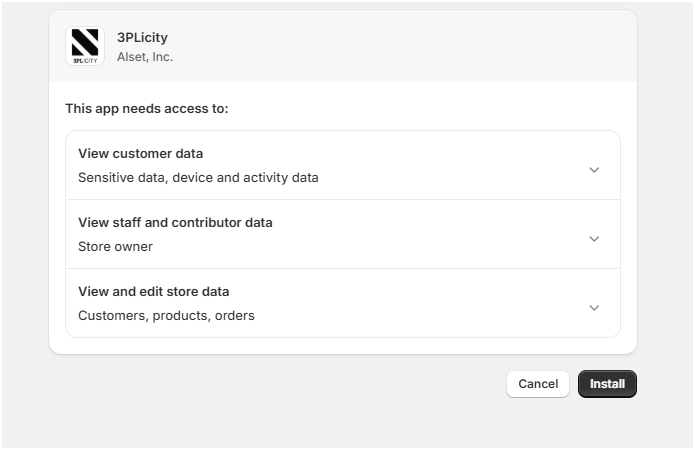
Accept and click Install
The platform will begin establishing the connection and importing available Shopify data.
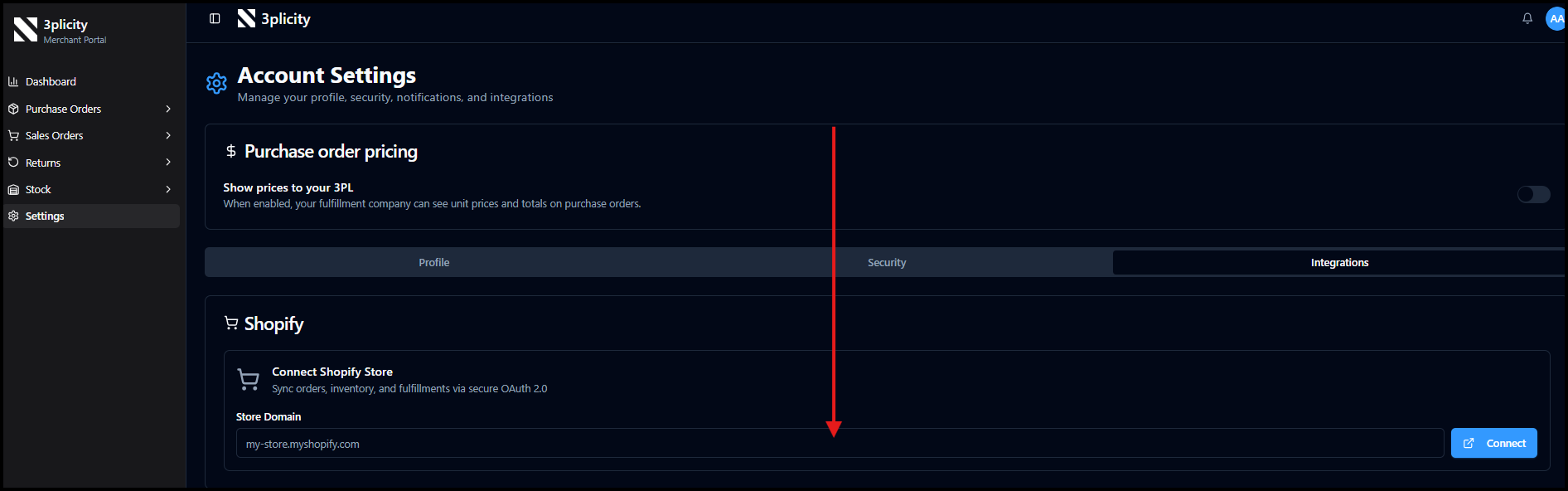
Shopify Store URL Format
When entering the Shopify store URL, use only the store domain.
Example:
alset-2-axel.myshopify.com
Do not include:
https://
http://
Including the protocol may prevent the connection from being established successfully.
Initial Product Synchronization
After a successful connection, 3PLICITY automatically imports products that already exist in the Shopify store.
Imported product information may include:
Product names
SKUs
Product identifiers
Inventory-related information available through Shopify
This allows Merchants to begin managing inventory and fulfillment activities within 3PLICITY.
Purchase Orders
Shopify Purchase Orders are not imported into 3PLICITY.
Purchase Orders created or managed within Shopify remain outside the synchronization scope and must be managed through their respective systems.
Sales Order Synchronization
After the integration is active, new Shopify customer orders are automatically synchronized with 3PLICITY.
Orders created in Shopify are imported as Sales Orders and become available for fulfillment operations.
These synchronized orders can be viewed and managed from:
Sales Orders → Pending
Once imported, they follow the same operational workflow as manually created Sales Orders.
Managing Shopify Orders in 3PLICITY
Imported Shopify orders appear in the Sales Orders module where warehouse and fulfillment teams can:
Review order details
Verify customer information
Process fulfillment activities
Approve and prepare shipments
Track order progress through fulfillment statuses
Orders continue moving through the standard 3PLICITY fulfillment workflow after synchronization.
Real-Time Synchronization
New Shopify orders are synchronized automatically after they are created in Shopify.
This allows operational teams to monitor incoming orders directly from the Sales Orders section without manually recreating order information.
As new orders arrive, they become available for review and processing within the Pending status workflow.
Operational Workflow Summary
Connect a Shopify store during onboarding or through Settings > Integrations.
Enter the Shopify store domain without https:// or http://.
Complete the connection process.
Existing Shopify products are imported into 3PLICITY.
Future Shopify Sales Orders are synchronized automatically.
Orders appear in Sales Orders under the Pending status.
Fulfillment teams process and manage orders using the standard 3PLICITY workflow.
This integration helps Merchants centralize inventory visibility and fulfillment operations while continuing to sell through their Shopify storefront.
Was this article helpful?
That’s Great!
Thank you for your feedback
Sorry! We couldn't be helpful
Thank you for your feedback
Feedback sent
We appreciate your effort and will try to fix the article
